
The left or right REAL BLUE TWS earbud can be purchased individually, for example, in case of loss.
Which model do you have?
Number of LEDs and position of the Teufel logo on the front of the charging case:
- 3 LEDs and logo on the front = REAL BLUE TWS charging case (left image)
- 3 LEDs and logo on top = REAL BLUE TWS 2 charging case (middle)
- 4 LEDs and logo on top = REAL BLUE TWS 3 charging case (right image)
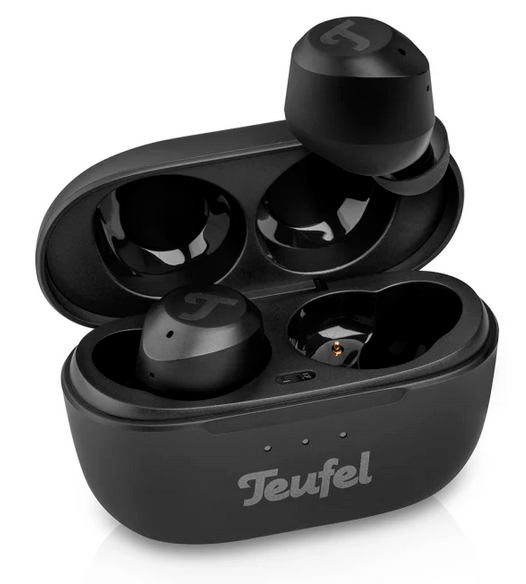
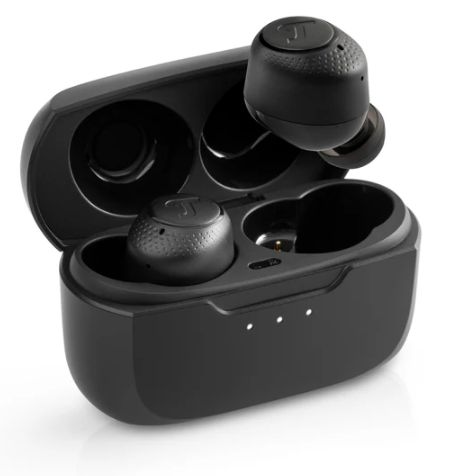
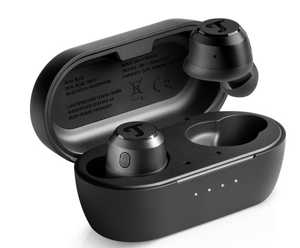
REAL BLUE TWS / REAL BLUE TWS 2 / REAL BLUE TWS 3
Step-by-Step: Pairing a Replacement Earbud
- First, turn off Bluetooth on your smartphone, tablet, or other audio device during the setup process.
Note: If you skip this step, pairing may fail.
- REAL BLUE TWS 2 only: Delete the earbud’s Bluetooth device list. To do this, take the working earbud and tap the multifunction button (on the Teufel logo side) 5 times.
- Next, tap the multifunction button 3 times in a row. The LED will briefly show a white light.
- Next, tap the multifunction button 3 times. The LED will briefly light up white. Take the new earbud and also tap its multifunction button 3 times. On REAL BLUE TWS / TWS 2, both earbuds will briefly flash white if pairing is successful. Warning: if only one earbud lights up, pairing was not successful. For REAL BLUE TWS 3, you can check the display on your device or the app (after reconnecting). If pairing fails, repeat the process from step 1.
- Finally, turn Bluetooth back on and reconnect via your device’s Bluetooth list. The new and existing earbud will now work together as a pair again.