
The left or right REAL BLUE TWS earbud can be purchased separately, for example if one is lost.
Which model do you have?
Number of LEDs and position of the Teufel logo on the front of the charging case:
- 3 LEDs and logo on the front = REAL BLUE TWS charging case (left image)
- 3 LEDs and logo on top = REAL BLUE TWS 2 charging case (center)
- 4 LEDs and logo on top = REAL BLUE TWS 3 charging case (right image)
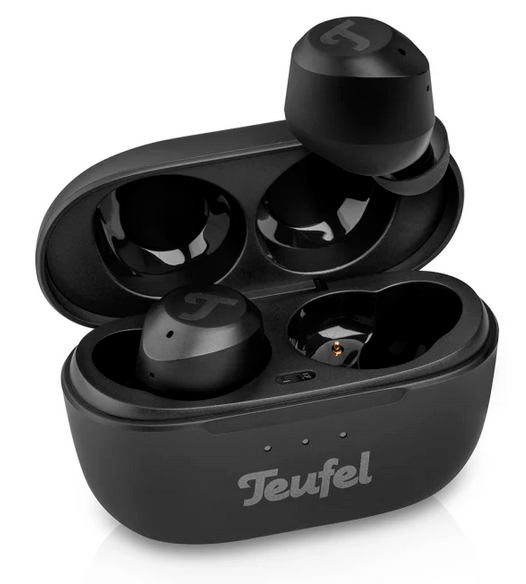
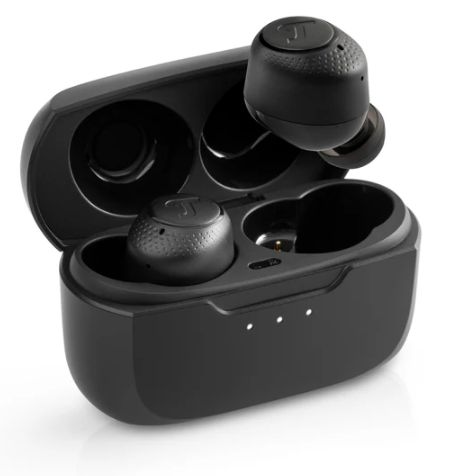
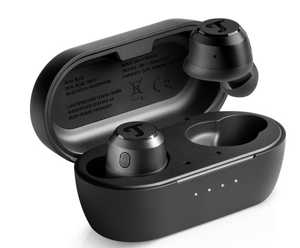
REAL BLUE TWS / REAL BLUE TWS 2 / REAL BLUE TWS 3
Preparation
- Turn off Bluetooth on your playback device (smartphone, tablet, or computer).
- Make sure both earbuds are sufficiently charged.
- Then select the instructions that match your model.
REAL BLUE TWS and REAL BLUE TWS 2
Step 1: Prepare the earbuds
Take the existing and the new earbud out of the charging case.
Step 2: Only for REAL BLUE TWS 2
Delete the earbud’s Bluetooth device list. To do this, take the existing earbud and tap the multifunction button 5 times (the Teufel logo on the side facing your head).
Step 3: Pair the earbuds with each other
- Tap the multifunction button on the existing earbud three times.
- Then tap the multifunction button on the new earbud three times.
- Wait a few seconds.
Pairing was successful when the LEDs on both earbuds briefly light up white.
Step 4: Connect to the playback device
- Turn Bluetooth back on on your playback device.
- Connect to “REAL BLUE TWS.”
- Both earbuds should now function as a pair again.
REAL BLUE TWS 3
Step 1: Prepare the earbuds
Place the existing and the new earbud in the charging case.
Step 2: Pair the earbuds with each other
- Leave both earbuds in the charging case.
- Briefly press the multifunction button on each earbud three times.
- Wait a few seconds until pairing is complete.
Step 3: Connect to the playback device
- Turn Bluetooth back on on your playback device.
- Connect to “REAL BLUE TWS 3.”
- Check the connection in the Bluetooth device list or in the app.
Troubleshooting
Did pairing not work?
- Make sure Bluetooth is disabled on your playback device during pairing.
- Repeat the process from the beginning.
- Make sure to use the steps for your model:
- REAL BLUE TWS / REAL BLUE TWS 2: Take the earbuds out of the charging case.
- REAL BLUE TWS 3: Leave the earbuds in the charging case.
Translated with the help of AI